The Pixxel Agency
  • 0 Shopping Cart
  • Home
  • Store
    • Browse All
    • Hosting
    • Care Plans
    • SSL Certificates
    • Register a New Domain
    • Transfer Domains to Us
  • Knowledgebase
  • Contact Us
  • More
  • Account
    • Login
    • Forgot Password?
  1. Portal Home
  2. Knowledgebase
  3. Plesk
  4. CloudLinux (Plesk)
  5. How to Enable ionCube Loader using CloudLinux Selector in Plesk?

  Categories

DNS - Nameservers
6
Elementor
1
Installing a Control Panel
6
Others
3
PayPal
7
Plesk
47
WordPress
17

  Categories

  Support

My Support Tickets
Announcements
Knowledgebase
Downloads
Network Status
Open Ticket

How to Enable ionCube Loader using CloudLinux Selector in Plesk? Print

  • 0


You can use CloudLinux Selector to enable ionCube Loader in Plesk.


1. Log into your Plesk account.

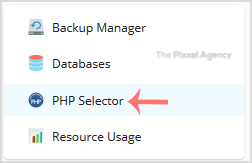
2. In the right-hand sidebar, Click on PHP Selector.
 

3. Click on the Extensions menu.

Note: If the Extensions page shows an error related to the native PHP version, change it to a non-native version first.


4. Tick mark the ioncube_loader Once enabled, it will display a success message.
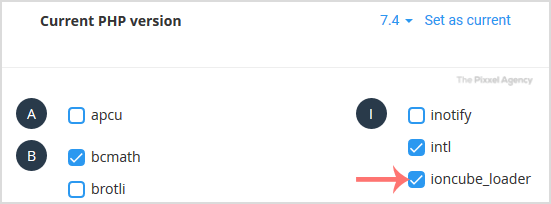
 

The message will read that the module ionCube Loader is saved.


Was this answer helpful?

Related Articles

How to Change the PHP Version via CloudLinux Selector in Plesk?   You can use CloudLinux's Select PHP Version to change your website's PHP Version. CloudLinux... How to Enable the GD extension of PHP using CloudLinux Selector in Plesk?   You can use CloudLinux Selector to enable GD extension in PHP via Plesk.   1. Log in to your... How to Enable the Mailparse Extension of PHP Using CloudLinux Selector in Plesk?   You can use CloudLinux Selector to enable the Mailparse extension in PHP via Plesk.   1. Log... How to Enable or Disable PHP Extensions Using the CloudLinux Selector in Plesk?   You can use CloudLinux Selector to enable or disable available PHP extensions in Plesk.   1.... How to Enable or Disable PHP's allow_url_fopen using CloudLinux Selector in Plesk?   You can use CloudLinux Selector to enable or disable the allow_url_fopen directive in Plesk....
« Back

  Support

My Support Tickets
Announcements
Knowledgebase
Downloads
Network Status
Open Ticket
  • Contact Us
  • Terms of Service

Copyright © 2025 The Pixxel Agency. All Rights Reserved.


Loading...
Loading...

Choose Currency

£ GBP
EUR
$ USD

Generate Password

Please enter a number between 8 and 64 for the password length